Batch upload & export Word, Excel, images
This repo lets you batch upload PDFs and export them to Word, Excel, or images directly from a browser, including preserving layout and searchable text.
ComPDFKit/compdf-self-hosted
Edit, convert, and transform documents across PDFs, Office formats, HTML, TXT, CSV, RTF, JSON, and images with ComPDF Self-hosted, an open-source PDF platform.
THE USEFUL PART
Edit, convert, and transform documents across PDFs, Office formats, HTML, TXT, CSV, RTF, JSON, and images with ComPDF Self-hosted, an open-source PDF platform.
THE STACKRADAR WALKTHROUGH
A short introduction from our reel. See the project README for the current details.
This repo lets you batch upload PDFs and export them to Word, Excel, or images directly from a browser, including preserving layout and searchable text.
Beyond conversion, this repo lets you merge, split, rotate, and annotate PDF pages, so you can tidy up documents before sharing, or add watermarks directly.
Pays off with practical security benefit: on‐premises deployment keeps data private.
GITHUB SNAPSHOT
Recorded counts, not a growth rate or a quality score.
OBSERVED STAR HISTORY
3 real daily observations. 150 → 150 stars.

FROM THE PROJECT
Source excerpts from the project's README. Not an independent review, verification or security audit.
English | 繁體中文 | 简体中文
Part of the KDAN ecosystem, ComPDF Self-Hosted offers PDF editing and document conversion, helping teams process PDFs, Office files, and images securely in private Docker deployments.
If you find ComPDF Self-Hosted useful, please consider giving us a ⭐ Star on GitHub. It helps us grow and improve. Got questions or ideas? Join the conversation in our Discussions.
Features • Quick Start • Architecture • Upgrade to Enterprise • Documentation • Support • License
Unlike traditional SDKs that require deep integration, ComPDF Self-Hosted is a ready-to-deploy open-source PDF processing platform. It combines PDF editing and conversion capabilities, while also supporting image format conversion—covering the full spectrum from documents to images. This enables enterprises to quickly establish a fully controllable, self-owned document center.
Docker Compose deployment
Complete PDF tool center — edit, convert, merge, split
API key management and license management
Private deployment with enterprise-ready architecture
Commercial support and dedicated assistance available
Whether you're building an internal document platform, document automation workflow, or enterprise PDF service, ComPDF Self-Hosted helps you get started in minutes.
ComPDF Self-Hosted provides a ready-to-use open source PDF editor, open source PDF converter, and open source image converter center directly accessible through a browser.
| Category | Features |
|---|---|
| Batch Processing | Batch upload and processing of files |
| MCP Server | Connect Agent platforms through MCP for file processing |
| PDF Editing | Merge, split, rotate, insert, delete, extract PDF pages, compress PDF files |
| PDF Security | Add watermark, remove watermark, encrypt, decrypt, add header and footer, remove header and footer, add bates numbers, remove bates numbers |
| PDF to Others | Word, Excel, PowerPoint, images, HTML, TXT, CSV, RTF, JSON, searchable PDF, OFD, Markdown and PDF/A |
| Others to PDF | Word, Excel, PowerPoint, HTML, TXT, CSV, RTF and PNG |
| Image to Others | Word, Excel, PowerPoint, HTML, CSV, TXT, RTF, JSON and PDF |
Available formats and processing limits depend on the deployed App image and SDK license. Repository code is open source; commercial PDF/Conversion SDKs and valid runtime licenses are provided separately.
ComPDF Self-Hosted provides a unified management console for viewing API Key details, API usage, and License status, as well as supporting operation log auditing, account management, and core system configuration.
Log in to the Dashboard with the initial account and password, then change the username and password before use.
Initial account: admin
Initial password: admin
Overview Panel: Displays API Key details, API usage statistics, License scope, and usage status.
License Management: View the product's License file, running status, and version permissions; supports one-click replacement of the License file and product upgrades.
API Key Management: View and copy your API Key and its running status to authorize third-party systems, services, or Agents to call the API for document processing.
MCP Server: Obtain configuration code and API Keys for Agent platforms to connect them and enable professional PDF processing capabilities for AI.
Operation Logs: Track, search, and export all the operation logs.
Product updates: Check the latest version details, download the new version, and enable it.
Account Management: Set the username and password.
System Settings: Set the name, logo, and theme color of the system.
Batch uploads, per-file passwords, sequential processing, status tracking, failed-file retry and ZIP downloads.
REST APIs for integration with internal systems and document automation workflows.
MCP: API Key-authenticated Streamable HTTP tools for operation discovery and batch management.
All three methods below are supported. Reserve storage for images, data and backups. Default Infra/App images target linux/amd64. Docker methods require Docker Engine/Desktop in Linux container mode and Compose v2 supporting up --wait --wait-timeout.
A License will be generated automatically during deployment, so you do not need to provide one. To upgrade to a paid version, contact Sales and replace it in the Dashboard License management module.
On Linux, WSL or macOS, run in a writable directory. Bash, curl and Docker must already be installed; Git and Node.js are not required. The default directory is ./compdf-self-hosted:
curl -fsSL https://raw.githubusercontent.com/ComPDFKit/compdf-self-hosted/main/deploy/install.sh | bash -s -- --prepare-onlyTo review the script first or choose an installation directory:
curl -fsSL https://raw.githubusercontent.com/ComPDFKit/compdf-self-hosted/main/deploy/install.sh -o compdf-install.sh
# Review the script; the current user needs write permission to /opt.
bash compdf-install.sh --dir /opt/compdf --prepare-only
The installer resolves one source commit, downloads minimal deployment assets and creates configuration, font and data directories. --prepare-only prepares files for configuration without starting services; --dry-run prints the plan. Use --ref to select an existing release tag or source commit. Image tags come from the configuration; controlled deployments should use verified digests.
Place the issued trial or production license at configs/app-license/license.xml inside the installation directory before starting services. The directory is mounted into App automatically; the repository does not include a valid SDK license. Put authorized fonts in fonts/windows/. Fresh installs can import the directory containing license.xml with --sdk-license-dir; use --fonts-dir for fonts.
From the parent of the default installation directory, run:
# Start services or apply the configured environment.
bash ./compdf-self-hosted/install.sh install --dir ./compdf-self-hosted
bash ./compdf-self-hosted/install.sh status --dir ./compdf-self-hosted
bash ./compdf-self-hosted/install.sh logs --dir ./compdf-self-hosted
# Stop services while preserving configuration and data.
bash ./compdf-self-hosted/install.sh stop --dir ./compdf-self-hosted
For /opt/compdf, use /opt/compdf/install.sh and --dir /opt/compdf. Repeated installation preserves existing files/data and pulls configured images; it does not update deployment scripts or roll back the database. Use the saved installer commands to retain its Compose project identity. Back up the database, storage, configuration and licenses together before changing versions.
Requires Apple Silicon, macOS 26+, Apple container 1.5.0, jq and curl. Default amd64 images require Rosetta. Select the Apple runtime in the same installer:
curl -fsSL https://raw.githubusercontent.com/ComPDFKit/compdf-self-hosted/main/deploy/install.sh | bash -s -- --runtime apple --prepare-onlyPlace the issued license at configs/app-license/license.xml in the prepared directory, then run the install command below. The installer starts Infra → App → Server, checks health and injects dependency IP addresses. Configuration is saved in .apple.env; the default published endpoint is local http://localhost:8080. Later commands must include --runtime apple:
bash ./compdf-self-hosted/install.sh install --runtime apple --dir ./compdf-self-hosted
bash ./compdf-self-hosted/install.sh status --runtime apple --dir ./compdf-self-hosted
bash ./compdf-self-hosted/install.sh logs --runtime apple --dir ./compdf-self-hosted
bash ./compdf-self-hosted/install.sh stop --runtime apple --dir ./compdf-self-hosted
Existing containers are not overwritten. Recreating them requires refreshing dependency IPs and preserving persistent volumes. This mode does not integrate the Docker Updater or supply an automatic restart daemon. After stopping services, recreate all three containers in dependency order to refresh their IPs. Read PROJECT from .apple.env, remove only that project's stopped containers with container delete, then run the saved install command again. Retain the network, named volumes and mounted configuration/storage directories.
For a complete checkout or custom Compose configuration:
git clone https://github.com/ComPDFKit/compdf-self-hosted.git
cd compdf-self-hosted
cp .env.example .env
mkdir -p configs/app-license fonts/windows data/server-storage
Configure .env, image versions, issued licenses and fonts as described in Method 1, then start:
docker compose --env-file .env config --quiet
docker compose --env-file .env pull
docker compose --env-file .env up -d --wait --wait-timeout 600
docker compose --env-file .env ps
Environment changes require docker compose up -d to recreate affected containers. Retain the original project name and persistent volumes. The base Compose publishes port 8080; it may listen on all host interfaces. Use up to create containers; start only resumes containers that already exist.
| Entry | Default address |
|---|---|
| ComPDF Web | http://localhost:8080/ |
| Dashboard | http://localhost:8080/admin |
| Health | http://localhost:8080/api/v1/status |
For a remote Docker host, replace localhost with its controlled endpoint. First initialization creates admin / admin; change the password after login. Configure HTTPS, CORS and access controls before external use. Keep issued credentials, fonts and runtime data out of Git.
Clients check this repository's signed stable channel. A higher published product version offers an update; an arbitrary source commit does not. After verification and administrator approval, Updater pulls immutable App/Server images from Docker Hub, backs up data, applies any declared migration, restarts services and verifies real PDF processing.
Missing/unreachable or expired metadata does not confirm a successful latest-version check. Updater independently verifies signatures before installation.
Dashboard product installation and online runtime XML License updates use the containerized Updater included in the default Compose file. Copy .env.example to .env; it already contains the current stable feed's COMPDF_UPDATE_KEY_ID and Base64 Ed25519 COMPDF_UPDATE_PUBLIC_KEY. Replace them only when the signing key changes. The default feed is this repository's updates branch. From a complete checkout, start all published services with:
docker compose --env-file .env pull
docker compose --env-file .env up -d --wait --wait-timeout 600
Minimal Docker installations can continue using the recorded overlay and saved project name from .compdf-install. New full checkouts do not need the overlay; the older docker-compose.updater-container.yml remains for compatibility.
To build local source, use docker compose -f docker-compose.full.yml up -d --build --wait --wait-timeout 600. Installation always needs administrator confirmation. The default Compose command starts the application, Updater and Infra together.
Back up the database, storage, configuration and licenses before an upgrade. Do not delete persistent volumes or relabel an existing database's schema history. After an update, use docker compose -f tmp/runtime-updater/docker-compose.json up -d to restart business services with their installed versions; manage Updater with its original Compose configuration. Rebuilding older source can replace an installed update.
Maintainers publish images and signed metadata using the manual Publish release workflow in .github/workflows/release.yml. Configure its release environment with secrets DOCKERHUB_USERNAME, DOCKERHUB_TOKEN, RELEASE_SIGNING_PRIVATE_KEY (Base64-encoded 64-byte Ed25519 private key), and variable RELEASE_SIGNING_KEY_ID. Distribute the matching 32-byte Base64 public key and key ID to installations; keep the private key in the release environment. Align versions in release/version.json, create an immutable version tag, then run the workflow for that tag. It publishes Server/UI and Updater images and signs stable/release.json plus stable/release.json.sig on the updates branch. Pushing source alone does not create an update feed or Docker Hub tags.
Infra supplies MySQL, Redis and object storage. App runs the PDF/conversion SDK. Server provides APIs, batch/MCP logic and the packaged UI. Optional Updater manages approved updates. Commercial SDK source is not included.
| Path | Purpose |
|---|---|
| frontend/compdf-web/ | Vue 3 + Vite UI and Dashboard |
| server/ | NestJS + TypeScript backend |
| updater/ | Go updater/publisher and container bootstrap |
| deploy/, helm/ | Canonical deployment assets |
| deployment/, release/, migrations/ | Contracts, versions and forward upgrades |
| configs/ | Settings and initial database schema |
Use Node.js 24 and npm; Server and UI have separate packages and lock files.
test -f .env || cp .env.example .env
docker compose -f docker-compose.dev.yml up -d --build compdf-infra compdf-app compdf-server
In a separate terminal:
cd frontend/compdf-web
npm ci
npm run dev
Frontend is http://localhost:5173, backend http://localhost:8080. Development exposes additional SDK/database ports; use an isolated environment. Windows users with an existing local stack can use scripts/start-backend-dev.ps1 for watch mode.
To build and deploy the Server/UI image from a complete source checkout:
docker compose -f docker-compose.yml -f docker-compose.build.yml up -d --build compdf-infra compdf-app compdf-serverApp and Infra still use their configured images. These source commands are for the complete repository, not the minimal directory created by the installer.
| Option | Purpose | Files |
|---|---|---|
| Kubernetes / Helm | Cluster deployment using the bundled chart | Chart |
| Source / binary | Controlled Linux Server/UI deployment; App/Infra remain separate | Packaging scripts |
| Nginx / Keepalived | TLS and entrypoint availability; application/data HA needs separate design | Configuration |
| Offline delivery | Image export and signed offline packages | Offline tools |
Nginx is an entrypoint layer; online/offline describes delivery. These options can accompany Compose or Kubernetes. Compose Updater does not manage Kubernetes or Apple container.
Actual features, page limits and concurrency are determined by the issued license and commercial agreement; contact sales to confirm deployment requirements.
Contact sales to update to the Enterprise Edition.
| Feature | Free Edition | Enterprise |
|---|---|---|
| PDF Editing | ✅ | ✅ |
| PDF Conversion | ✅ | ✅ |
| Web UI | ✅ | ✅ |
| Dashboard | ✅ | ✅ |
| Batch Processing | ✅ | ✅ |
| Watermark-Free Output | ❌ | ✅ |
| Unlimited Pages | ❌ | ✅ |
| Custom Concurrency | ❌ | ✅ |
| Commercial License | ❌ | ✅ |
| Technical Support | ❌ | ✅ |
SDK Documentation: https://www.compdf.com/guides/pdf-sdk/self-hosted-deployment/overview
API Reference: https://www.compdf.com/guides/pdf-sdk/self-hosted-deployment/api-reference-conversion
Report code issues through GitHub Issues.
Have suggestions? Start a discussion. If you find ComPDF Self-Hosted useful, please consider giving us a ⭐ Star on GitHub. It helps us grow and improve.
Repository code uses the MIT License. Commercial PDF/Conversion SDKs, valid runtime licenses and customer fonts are provided separately. Visit ComPDF or contact sales for product/enterprise support. Report code issues through GitHub Issues.
Built by the ComPDF team. Website · Docs · Enterprise Inquiries
Read the original READMEKEEP EXPLORING
 Repository preview
strelov1/freehire
Open-source search engine aggregating 3.3M+ tech jobs directly from 294k+ company career pages. Zero recruiters, no reposts.
git clone https://github.com/strelov1/freehire.gitzenhostai/9drive
Virtual storage gateway pooling multiple free Google Drive accounts into a combined 60GB+ high-speed personal bucket.
git clone https://github.com/zenhostai/9drive.git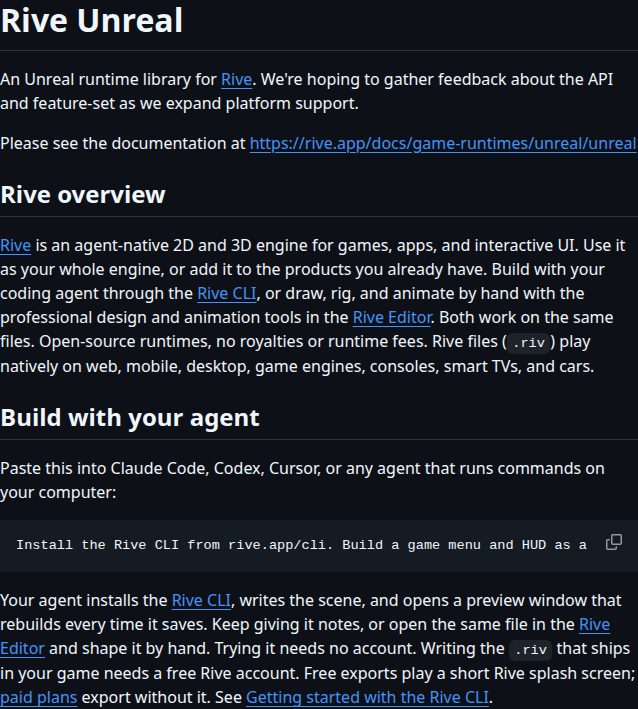 Repository screenshot
rive-app/rive-unreal
Unreal Engine runtime for Rive, the agent-native 2D and 3D engine for games, apps, and interactive UI.
git clone https://github.com/rive-app/rive-unreal.git
Short demos. New discoveries. Less noise in your feed.